Search This Blog

12.3.13

0 How To Force-Quit Running Apps On iPhone or iPad Devices

Once in a while, some apps tend to act funny and completely freeze-up your device.
Though, this isn't a common/rampant issue with an iOS, it might just happen that your iPad/iPhone becomes unresponsive to touch and then the device is stuck with sometimes a white screen.
Luckily, you can now easily force-quit applications in times like this without having to download any extra softwares.

Here's How...

Method 1 »
  1. Hold down the device's ‘Power button’ at the 'top' and wait until “Slide to Power Off” message appears on the screen.
  2. Release the ‘Power button’
  3. Finally, hold the ‘Home button’ at the base of the screen until the frozen application is forced to quit.
Method 2 »
  1. Double-click the ‘Home’ button until the app-switcher pops-up on the screen.
  2. Hold-down the frozen application's icon and click on the Minus symbol at the top-left side of the icon.
If after trying both methods and the problem persists, you might consider switching-off the phone itself or if on next reboot, thesame app gives you this problem, then you should delete it and download its latest version from the App Store.

7.3.13

0 How To Add ‘Open With’ To Right-Click Menu For All Files

To open files/programs with 'specific' applications on windows is not quite straightforward as you have to pass through some processes before getting to the final destination.

Having to repeat this tardy steps everytime can even make it a whole lot more frustrating.
Therefore,a solution has been provided in this article to make opening of files with dedicated softwares a click-away.

In this tutorial,I'll be making use of “Notepad” as an illustration,but be rest assured all softwares are configured thesame way.

How To Add applications To Right-click Menu.

  1. Open ‘Registry’ by holding Windows key + R
  2. Type ‘Regedit’ in the textbox and hit enter.
  3. Navigate to “HKEY_CLASSES_ROOT\*\shell” and right-click on shell
  4. Go to New » Key and give the newly created key a name you can easily remember E.G 'Open Notepad'
  5. Again, right-click on the new key and create another key below it.
    Give it the name “command”
  6. Now, double-click on “(Default)” at the right panel, and paste this in the text-box.
    notepad.exe %1
    and the change will take effect automatically.
  7. Note »
    To switch notepad with another application or create a new one,simply change ‘notepad.exe’ with another application's name.
    E.g :
    Photoshop.exe
That's all.
I believe this isn't new to some computer geeks,but it sure is to others.

16.2.13

0 How To Encrypt Computer's Hard-drive And Flash Drives To Ensure Maximum Security

Do you have some Private/personal files and folders on your Pc's hard-drive,Usb/Flash drives or other external storage devices you would like to protect?
Has it always been a challenge for you to keep utmost secrecy of your datas?

Well,all you need do is Encrypt them...
According to Wikipedia, Encryption is the process of encoding messages (or information) in such a way that eavesdroppers or hackers cannot read it, but that authorized parties can.[Read more here.]
Therefore,from the context above,you should decipher that the best way to ensure total privacy of a file is to encrypt it.

How Then can You Encrypt A Drive?

There are Tons of Softwares capable of performing this task and the best I've found so far is ‘TrueCrypt’.

TrueCrypt

TrueCrypt's a freeware capable of establishing and maintaining an on-the-fly-encrypted drive.
I.e Data is automatically encrypted or decrypted right before they are loaded or saved without the user's intercession.

Some key features of TrueCrypt »

  • It Encrypts an entire partition or storage device such as USB flash drive or hard drive.
  • Encryption is automatic,real-time (on-the-fly) and transparent.
  • Encrypts a partition or drive where Windows is installed (pre-boot authentication).
  • It offers powerful data protection,recommending complex passwords,explaining the benefits of hidden volumes, and erasing telltale signs of the encryption process, including mouse movements and keystrokes.
  • It creates a virtual encrypted disk within a file and mounts it as a real disk.
So to download this file,simply
CLICK HERE![3.3MB].

22.1.13

80 How To Remove Shortcut Virus From Computer And Drives.

Have you ever encountered 'Shortcut viruses' on your flash drive/External Hard disk before?
If yes,then you should know how frustrating they can be.
Well,as it is,just having an Anti-virus on a Computer system isn't protective enough, but occasionally updating it as new viruses are being made and spread each day.
Amongst these numerous viruses,there's this virus which is capable of changing/turning folders of extremely large MBs/GBs into small KBs and its often named “regsvr virus”.

(NOTE: Do not confuse it with the System file regsvr32 as they are two entirely different files.)
Like I mentioned above,when this virus strikes your Computer it automatically changes folders & sometimes files into a shortcut which can neither be opened nor run.

So, in this tutorial, I'll be giving some tips on 'how to get rid of these viruses on a system and retrieve your files back.
As there are `a thousand and one` fixes for this issue, I'll try as much as possible to give the easiest of them here.
Tighten your seat-belt and let's begin.

How To Get Rid of Shortcut Viruses On A Computer and Removable Drives

First and foremost,it's advisable you update your Anti-virus to see how it all goes and if this doesn't solve the issue,you can proceed to the methods below.
  1. Apart from updating your Antivirus, there are some softwares capable of getting rid of this virus.
    The best of them are listed below 
    So,download any of those and follow the instructions on the sites to use them.
  2. Manual fixes are also available to solve this problem.Therefore,you can make use of any method you consider easier.
    • a.) Insert whichever drive is infected by this virus into your system and check the drive's extension i.e A: .... Z: from ‘My Computer’
      b.) Click Start » Run / Winkey+R and type "cmd"(without quotes) in the textbox provided - Hit Enter.
      c.) Now, input the code below into the command prompt and hit 'Enter'.
      attrib -h -r -s /s /d E:\*.*
      (Change E: to your drive's extension.)
      d.) Do check to confirm that the virus has been completely cleared-off.

    • Else,you can use this alternative.
      a.)Go to the control panel to untick “Hide protected operating system files” by navigating through the File-Menu i.e “Tools > Folder Options”... Now Select the  “View” tab, and Scroll down till you see “Hide protected operating system files”, untick it.
      b.)Navigate to “C:\Windows\System32” and manually delete regsvr (Please note: This is different from the file "regsvr32.exe".
    • NB: 
      If you can't find the file in System32, then try locating it in “C:\program files”
      If you still cannot find it there,then try locating it in the “Processes” tab in Task Manager.
Now,with all the softwares & manual fixes highlighted above,one is bound to work for the drive.
If you encountered any trouble understanding this post, kindly inform us by using the comment box below.
Also, don't forget to share with your Friends.
Thanks.  

17.1.13

1 How To Delete Real Player History In Mobile Phones

By default,mobile Real Player app. saves up to 6 most recently viewed files in a Symbian phone and this is rather infuriating as everyone making use of the application will have an easy access to all files which the user had recently viewed on the system.Realplayer logo.jpg

In a case whereby you pick up someone else's phone to watch/spy their videos without authorization,then it is 'very' impossible to deny responsibility.
But if it's a must that the person shouldn't know,then what's the solution?
Would you Format/Restore thier factory settings?

NAH,that's stupidity...
What else can be done?

In this tutorial,I'll be showing you an extremely easy way to clear your Real Player's history without passing through a whole lot of stress.

Requirements
Once those are gotten,we are ready to fire-on.

Steps To Clear Real Player History.

  1. Launch/Open your File Manager(Xplore)
  2. Navigate to C:\private\10005A3E\
    (Launch Rom Patcher if you can't gain access to “Private” folder.)
  3. Next,delete the .dat file present in it,i.e ‘mediaplayer.dat’.
  4. Finally,open your Real player to confirm 'history' deletion.
That's all.

If you would like to permanently disable this feature,then follow the steps below.

  1. Launch your Xplore and navigate to C:\private\10005A3E\
  2. Next,delete ‘mediaplayer.dat’ and create a new-empty txt file
  3. Name it Mediaplayer.dat and change its attributes to ‘read only’
You can now exit all open applications and try viewing a video file to ensure all is working perfectly.

Do you have any questions and/or suggestions?
Kindly post them here.

9.1.13

1 How To Create Password-Protected Folders Without Using A Software.

Securing personal files/softwares cannot be guaranteed in a situation whereby more than one person is permitted to a make use of a computer.
In this case,it is very necessary to ensure all sensitive/personal documents are kept hidden from the view of such users.
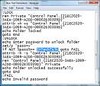
But how can you do that without a software?

Well,here's an easy way to it.
So,if you think there's a file/folder you'd like to keep hidden from the reach of others,just follow the steps below.

How To Secure Files/Folders Without Software

  1. Create a new folder and create a new ‘Text Document’ in it by right-clicking and selecting ‘New’ » ‘Text document’.
  2. Copy - Paste the following code snippet in the text document

    cls @ECHO OFF title Folder Private if EXIST "Control Panel.{21EC2020-3AEA-1069-A2DD-08002B30309D}" goto UNLOCK if NOT EXIST Private goto MDLOCKER :CONFIRM echo Are you sure you want tolock the folder(Y/N) set/p "cho=>" if %cho%==Y goto LOCK if %cho%==y goto LOCK if %cho%==n goto END if %cho%==N goto END echo Invalid choice. goto CONFIRM :LOCK ren Private "Control Panel.{21EC2020-3AEA-1069-A2DD-08002B30309D}" attrib +h +s "Control Panel.{21EC2020-3AEA-1069-A2DD-08002B30309D}" echo Folder locked goto End :UNLOCK echo Enter password to unlockfolder set/p "pass=>" if NOT %pass%== password here goto FAIL attrib -h -s "Control Panel.{21EC2020-3AEA-1069-A2DD-08002B30309D}" ren "Control Panel.{21EC2020-3AEA-1069-A2DD-08002B30309D}" Private echo Folder Unlocked successfully goto End :FAIL echo Invalid password goto end :MDLOCKER md Private echo Private created successfully goto End :End

  3. Locate `Password here` in the code above and change it to whatever password you want to use (Simple to remember,but hard for others to guess)
  4. Now click on File » Save as and give it any name you so desire but with a .bat extension.
    E.g : Lock.bat
  5. Now,exit notepad and on getting to the new folder you created previously, you'll see a "LOCKER" command.
  6. Double-click on this file and a new folder will appear (Private OR Confidential)
  7. Now,copy/move all you want to hide in this “Private/Confidential” folder and go back one step.
  8. Double-click on the "LOCKER" command again and you'll be greeted with something new.
  9. Just press 'Y' as instructed and hit enter.
    Immediately,the ‘PRIVATE / CONFIDENTIAL’ folder will disappear.
  10. Now,all your files & documents are secured in this hidden folder.
  11. To undo hiding,double-click on this “Locker” command again and input the password you used above. Hit Enter and the hidden folder will re-appear..
Now,that's it.

NOTE ↓:
These files can still be sometimes accessed using the search,so it is highly recommended you rename your files before hiding them so as to ensure its maximum security.

Is there any questions,suggestions or corrections?,kindly drop them behind...

6.1.13

2 HOW TO CHANGE WINDOWS 7 STARTER BACKGROUND/WALLPAPER.

This being the very first post this year,I'd like to say ‘Happy New Year’ to you all.

By default,the Windows 7 Starter edition of windows does not include the Personalization feature to 'change desktop background',edit 'Sounds,color & ScreenSaver' when the desktop is right-clicked on,and this makes it rather galling.

Having to leave the Computer's background all blue is even more appaling.
As a newbie to using the starter version,I didn't know it was a minus to its features as I resolved within me that I'd purchased a fake Computer system and wanted to return it as I was still within the period of guarantee until I met an engineer who informed me that the background can 'NEVER' be changed unless the OS is changed to another version.

While still planning to purchase an higher version of the Windows 7,I came across a software while surfing the net and that changed the whole story.

So in this article,I'll be giving two softwares which in my perspective are the only ones available and capable of changing the Starter desktop background.
So,I'll advise you to sit back with a cup of coffee in hand coz you might need it while trying to decide which software to download.

Applications To Change Desktop-Background In Windows 7 Starter.

Like I mentioned above there are two applications capable of performing this task.
Therefore,I'll be stating their similarities,uniqueness likewise their download links here.

  1. Starter Background Changer 0.8.1 (SBC)»
  2. Just like the name depicts,this Software is good at one thing only.....
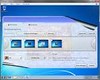
    Changing that awful looking static-blue background.

    Though,this software's translation is a bit weird (Only during the installation process),it surely is a must-have application for any Starter user.

    When installed,the ‘Personalize’ command which is previously not included in the desktop context menu will be added automatically.

    Now,whenever you select the Personalize command from the menu,you can easily modify the Wallpaper,Sound,Colors and Screensavers.

    Download link below ↓

  3. Oceanis background Changer(OBC)
  4. Just like the above mentioned software,OBC also helps to change the wallpaper of any Windows 7 starter operating system.
    The installation process and language used are pure english language unlike SBC.

Some Similarities and Uniqueness of SBC & OBC

Similarities
  • They have one purpose i.e To change the desktop background.
  • Both supports Slideshows.
  • Both is easy to use.

UNIQUENESS

  • SBC adds a ‘Personalize’ command/feature to the context menu when the desktop is right-clicked on.
  • The installation of OBC is wholly easy.
  • SBC gives the liberty to edit other features easily from one place(Sound,Color & Screensavers).
  • Selecting/Choosing images to make use of as slideshow is a bit more tedious in SBC.
  • OBC gives the liberty to Shuffle images set as slideshow
  • With OBC,you can choose to disable wallpaper slideshow while on Battery Power
  • The minimum time for slideshow effect in SBC is 10 seconds,while in OBC,it's 1 min.

With these few points,I guess you can now decide which of the softwares to go for.

[DOWNLOAD SBC HERE(776kb)]
[DOWNLOAD OBC HERE(3.17MB)]

3.12.12

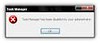
12 HOW TO FIX “TASK MANAGER HAS BEEN DISABLED BY YOUR ADMINISTRATOR” ERROR IN WINDOWS.

Task Manager can be said to be one of the most useful applications on a Computer system.
It really comes handy in occasions whereby some softwares can't be stopped or is Unstable.
It's also the 'number 1' choice to check all running processes,monitor CPU Performance etc.

But,what happens in the case it becomes inaccessible due to malwares or viruses? and you keep getting some funny errors like “Task manager Disabled by Administrator”?

So, if you've been getting this error while trying to access your task manager,here is a fix to enable it again.
There are different methods available to fix this problem on your PC and I'll be explaining two extremely easy methods here in this tutorial.

METHOD #1:-Registry Editor.

  1. Click on “Start” and navigate to “Run”[you can use the search.]
  2. Type “regedit” in the text box and hit “Enter”.
  3. Now,navigate to
    HKEY_CURRENT_USERS\Software\Microsoft\windows\currentVersion\Policies\System
  4. Once located, you'll see “Disabled Taskmgr” option at the right pane.
    Simply delete it or double click on it and change its value to “0”

METHOD #2:-Through the Group Policy.

Alternatively,if you do not find a “Disabled Taskmgr” key in Registry,then try this »
  1. Click on “Start” and navigate to “Run”[you can use the search.]
  2. Type “gpedit.msc” and hit Enter.
  3. Navigate to Configuration » Administrative Templates » System » Crtl+Alt+Del Option » Remove Task Manager
  4. Once found,right click on it to choose “Edit” and select “Not configured”.
  5. Finally apply & OK it, then exit.
That should fix it.But,if the Task Manager still refuses to be accessible, you can try scanning your PC for malmares.

That's all..
Any suggestions/questions?, kindly drop them here.

28.11.12

0 TRICK TO MAKE A COMPUTER`S KEYBOARD GO DISCO.

Have you ever wished you knew how to make your computer keyboard's-light go 'Disco'?
Have you longed for this feature in your computer, or you're just getting to know this for the very first time?
Then this post is for you...
Disco-light.jpg

The idea behind this trick is just to have fun / show off to friends, though some consider it rather annoying.
You don't need to have any coding/programming knowledge,as it's extremely easy to do.

In this tutorial,we'll be making use of this popular Computer application i.e Notepad.
Note:-
This illuminates & looks more fascinating in the dark.

Here's How To Do This.

  1. Open/Launch notepad [Right click on desktop » New » Text document].
  2. Copy - Paste the following codes into it ↓
    Set wshShell=wscript.CreateObject("WScript.Shell")
    do
    wscript.sleep 100
    wshshell.sendkeys"{CAPSLOCK}"
    wshshell.sendkeys"{NUMLOCK}"
    wshshell.sendkeys"{SCROLLLOCK}"
    loop
  3. Finally,save the file with a “.vbs” extension using any name.
    E.G Disco-light.vbs
  4. Now to start the effect,just double click on the newly saved text file to see the magic.
That's all.

If you think you don't like this effect,you can easily stop it by 

  • Hold keys “Ctrl + Alt + Del” and select Task manager
  • Locate wsscript.exe,select it and choose “End Process”.
  • Note : If your mouse doesn't respond any longer,just hold down the "Alt" key while you navigate.
Have Fun!!!

Also Read...

HOW TO EASILY FORMAT COMPUTER'S HARD-DRIVE USING NOTEPAD.
CREATE WORKING ANTI-VIRUS YOURSELF USING NOTEPAD.

18.11.12

0 HOW TO COPY/EXTRACT TEXTS FROM IMAGES EASILY ON COMPUTER.

Today,I'll be introducing to you a Pc software capable of copying/extracting text from any image.

Though there are some other applications capable of doing a fine job,for the benefit of this tutorial we'll be making use of “GT TEXT”

GT Text [Ground Truth Text].

Like mentioned above,GT Text is a 'freeware' software which allows its users copy text from picture files easily without having to pass through the stress of writing-out/re-typing every bit of words in a picture.

It comes handy when you're dealing with tasks involving images with words/quotes im-printed on it.
Sometimes,you might even take shots just for the texts in it e.g Taking images of an event's address on a poster/Bill board etc....

To use “GT Text”,just follow these easy steps...
  1. Visit the Software's download page [65MB] and download the latest version of the freeware.
  2. GT TEXT.JPG
  3. Once downloaded,install the program and run it.
  4. From the File manager that pops up,select which type of image you want to copy texts from and browse to the folder containing the image.
    Supported images include .jpg, .png, .gif, .BMP, & .TIFF.
  5. Next,select “Open” and when the image finish loading,click on the “Area Text OCR”
  6. Now,click and drag your mouse to highlight from the image the area you want to copy,then release the mouse.
  7. When released,an instruction pops-up.Just click on “Continue” to copy the highlighted section to the clipboard.
  8. Now,open your notepad and paste the text there.
If you'd like to extract the whole texts from the image,then you can easily do that by navigating to Tools » Copy Text From » Full image or by simply clicking on CTRL + F.
So either way,all text appearing on the image will be automatically saved to the clipboard.
Thereafter,you can do whatever you please with the text i.e editing,saving...

DOWNLOAD GT TEXT.[65MB]

THAT'S ALL. Hope you get the most out of the software.

9.11.12

0 HOW TO LOCK & UNLOCK A COMPUTER USING MOBILE PHONE'S BLUETOOTH.

Today,I'll be introducing to you yet another great Pc software.
It's such a handy software which makes securing of Computer easier.

Each passing day,new applications are being created to make the usage of computer simpler and less complex.
Amongst them is Bluetooth Proximity(BtProx).

Bluetooth Proximity is an application designed for Windows Vista and Windows 7.
It detects a paired mobile device and locks/Unlock the Computer based on the number of seconds/minutes set.

With Btprox,you do not need to worry about leaving your Computer-system running whilst leaving the room as you're rest assured its locked out of intruders might.
One other thing which makes this software a must-have is its nice feature of unlocking when you enter into the room.
Though,this feature is not fully functioning in some Systems(as complained by users),it does work on most Windows 7_64 Bits(Tested).
Likewise,the founder of this app. has promised a fully functioning software in newer updates.

The whole idea behind this software is to help save the stress of racking the brain to remember the shortcut to lock the computer without passing through a whole lot of stress.

Requirements of BTPROX.

  • Bluetooth-enabled Mobile phone.
  • A computer with embedded bluetooth[Not sure if it works with an external bluetooth adapter].

How To Lock/Unlock Computer Using BtProx.

To begin with this tutorial,download the latest Bluetooth Proximity HERE
  1. Install the application on your Computer
  2. Run/Launch it.
  3. Minimize it and go to your Bluetooth Suite to pair your Mobile phone with the Computer[If done,then skip]
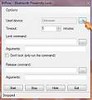
  4. Next to “Used device:”,click on “…” to select the paired Mobile device.
  5. Bluetooth proximity.jpg
  6. Once done,choose a default “Timeout” for your Computer to lock/unlock itself by directly inputing it or by clicking-on the Up-Down buttons.
    The minimum time is `0 min./60 sec.[No maximum]`
  7. Finally,click on “Start” to begin the lock command based on the number of minutes set for it to lock.
TIPS
  • Always set the timeout to 0 min. To save phone's battery life.
  • Try muting the Laptop so that intruders won't be notified of the lock due to the beeping sounds
  • When the specified mobile device is within range/the app. is running smoothly,the icon turns ORANGE.
    If it turns RED,then the device is out of range & the system is about to be locked automatically.
  • Whenever your switch-off your mobile phone's bluetooth,then the software sees it as “Out Of Range” and prepares to lock
  • To abort/end the application,simply click on the “STOP” button.
That's all.
With this,I believe the security of your Computer will be maximized.

7.11.12

0 HOW TO RUN JAVA(.Jar) GAMES & APPLICATIONS ON A COMPUTER.

Do you know you can run a Java application on your computer?
Have you ever thought of playing your favourite Java games on your Pc?

Now,all these have been made possible with "KEmulator".
Though,this might not be new to some old computer geeks,it indeed is for newbies.

KEmulator can be simply put as a Software designed to specifically run Java files on a computer.
As it is,'Java' is one of the most widely used programming languages in the universe.
Application developers tend to create more of Java files compared to developers in other platforms,and these files sometimes comes really handy which makes them un-neglectable.

Steps On How To Run Java Softwares On A Computer.

  1. Download KEmulator to your Pc[Link available below] and extract the contents of the zip folder to a new folder.
  2. Preferably,create a shortcut to the folder for faster accessibility.
  3. Next,run the application and you'll see a pop-up which looks exactly like the image below
  4. Now,to play or run a software,navigate to “Midlet” at the top-left corner of the screen and click to browse through your system.
  5. CHANGING THE SCREEN-RESOLUTION ~ At this point,newbies get frustrated with the default screen resolution which is by default set to display a Mobile phoneres. of 176 * 220 as they do not know how to tweak it.

    To change these values,go to View » Options and change it accordingly
    Note that you'll need to re-start the software for changes to take effect.

  6. Set a custom network proxy to make-use-of when you run a browser.This is also accessible from view > options.
  7. Lastly,you will need to configure the key-map to function as you deem-fit.
  8. [DOWNLOAD KEMULATOR HERE.]
Those are the main things to be known in the application.
If you need further assistance using the software,please use the comment box below.

29.10.12

3 HOW TO USE SYMBIAN PHONES AS HOTSPOT TO BROWSE THE INTERNET ON COMPUTER.

Connecting a computer to the internet is becoming lot more easier day-after-day with the development of new & great Softwares.Connected devices over wifi.jpg

In a post sometimes ago,I shared with us » “How To Connect A Computer To The Internet Using An Android Device.”
So,you don't have an Android Phone?,don't worry.
In this post,I'll be sharing with you yet another great software which works on Symbian S60 phones..
It's called “JOIKUSPOT”

JOIKUSPOT.

Joikuspot.jpgJoikuspot is a software-solution that simply helps to turn a Symbian Phone to a secure mobile WLAN(Wireless Local Area Network) Hotspot,i.e With Joikuspot,an S60 phone is converted to an open Wifi/Wlan Hotspot which can be used to connect a Computer to the internet to surf the web using a “Joikuspot generated mobile wifi access point”.
It was developed by JoikuSoft,with series of updates ever since its creation in 2008.

While installing the app.,you'll be prompted to select a language which is best understood by you.
Some of the featured languages include »

  • English (U.K & U.S.A)
  • French
  • German
  • Spanish
  • Italian
  • Swedish
  • Danish
  • Norwegian
  • Finnish
  • Portuguese
  • Turkish
  • Russian
  • Dutch
  • Slovenian
  • Chinese
  • Japanese
  • Arabic
  • Hebrew
  • Ukrainian
  • Indonesian
  • Korean [and much more]

Using Joikuspot for internet connection is extremely easy.
It doesn't require Bluetooth connections,neither does it require the usage of USB chords.

Just follow these simple steps →
  1. Download Joikuspot to your phone (Download Link Below)
  2. Install it on your device (Click “OK” to by-pass all pop-ups)
  3. Once installed,you'll be required to reboot your phone.
  4. Launch the application and select a valid Access point to turn your phone into a Wifi hotspot[3G Modem].
  5. Scan for “Open wifi networks” using your high-grade desktop/laptop.
  6. Once found,select “Connect” and you're ready to surf the net on your computer.
Note »
It's necessary for you to have data bundle on your sim-card for Joikuspot to work.

Some of the supported phones include
Nokia N8, E7, C7, C6, N900, E51, E52, E55, E60, E61 , E61i, E63, E65, E66, E71, E72, E73, E75, N78,N79, N80, N97, 808, 5800 and much more.

[DOWNLOAD JOIKUSPOT PREMIUM VERSION 3.10]
(Get the upgraded version from Nokia Ovi-Store)

That's all.If you're not clear with anything,please do not hesitate to use the comment box below.

ALSO READ
“How To Connect A Computer To The Internet Using An Android Device.”

26.10.12

0 BEST ANTI-MALWARE SOFTWARES FOR SYMBIAN PHONES.

While downloading and installing different applications on mobile phones, it sometimes becomes exposed to viral attacks.

Securing the phone,thereby becomes essential at this point.
Just as the saying goes,“Prevention is better than cure”,
It's better to guard against these attacks than searching for an engineer to format the phone.

In this tutorial,I'll be giving you a list of Anti-virus(es) to secure your Symbian phones with.

  1. Netqin Anti-virus.
    As at the time of publishing this post,this software can be said to be the best amongst others.
    It possesses so many great features which makes it outstanding from others.
    Below are some of Netqin's features…

    Features Of Netqin Anti-Virus.

    • Apart from the normal “Full scan” feature,it has the ability to scan specific files/folders on a mobile phone,which makes it relatively faster.
    • It lets users update the “Virus DataBase” easily to provide 99.9% protection against latest virus threats.
    • It has the “Safe mode” function which when clicked-on,closes all Non-system applications to return the phone back to its normal state.
    • An Anti-lost tab is also present to help guard against easy data access and phone usage in case the phone gets lost[Avialable for to Pro members only].
    • “Contact Backup” ability which saves all phone contacts.
    • “Network Firewall” tab where you can manage all phone internet connections from[Allow/Disallow specific application's access to the internet.]
    • Get full information about all app. installed on the phone,allow/disallow auto-boot of specific app. from the “System manager” tab.
    • Get logs of all activities performed on the software.
      AND SO MUCH MORE WHICH I CAN'T FINISH MENTIONING…
      [DOWNLOAD IT HERE]
  2. Rising Anti-virus.
    This is another great functionality software which does not only guard against malwares,but also empowered to perform other genius functions.

    Features of Rising Anti-Virus.

    • It comes in two languages i.e English & Chinese.
    • It has a more customized scanning ability to Netqin,as it allows you to choose whether to scan…“Running Processes”,“Phone memory” or “SD card”.
    • It has the ability to block calls when set to do so.You can keep Blacklist/Whitelist contacts and decide to receive calls from just numbers present in the Whitelist.
      In other words,you have the ability to block specific numbers from calling your mobile phone.
    • You can protect certain files on your phone directly from this software,as it renders it un-usable.
    • Finally,this app allows the viewing and managing of all running Processes on the smart-phone.
      [DOWNLOAD IT HERE.]
  3. Kaspersky Mobile Security (KMS)
    This is also one of the greatest mobile anti-virus of all time.
    Just like the others,it possess so many great features which we'll be brushing over…

    Features of K.M.S

    • Just like the above mentioned softwares,it also allows for customized scanning.
    • Amongst others,it has an option to unzipping archives in order to search for any form of malicious codes
    • With this software,you can scan all bluetooth-recieved SMS & MMS.
    • You can set the app. to start a full scan anytime.
      Though,this feature in present in others,it is more customizable in KMS.
    • It also possess an Anti-theft function to guard against private information leakage in case of theft.
    • It has a “Gps Find” option to track mobile phone down when lost/stolen.
    • Unlike R.Antivirus software above,KMS has both Sms & Call filter ability which lets you receive calls & sms based on the compiled Black/White lists
    This application possesses much more functionalities,but those are the key features.
    [DOWNLOAD IT HERE]
There are so many others,but in my perspective,the above mentioned comprises of all key-features of those other anti-viruses.

16.10.12

0 HOW TO COPY DATA FROM SCRATCHED CDs & DVDs.

Have you ever come across the error “Data not readable” while trying to recover/copy a data from your aged or scratched CDs and DVDs?
Have you ever wished you could get those important files back?,then worry no more…

This problem often surface when you are trying to use a scratched disk/a disk which has not been used for a very long time,thereby making the datas contained in it lost forever.

But,here comes the good news.
There is this Computer software I discovered which is powerful enough to help copy those datas which are embedded in such a disk.
It's called “COPYCAT”

Just as the name implies,this software copies all those datas from the disk directly into your system.

CopyCat.

CopyCat is a software developed by VCSoftware.
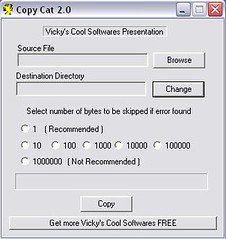
It helps to copy-out maximum bytes from a disk which an ordinary Windows copying cannot handle.CopyCat Screenshot.jpg

It skips totally-unreadable-bytes and extracts all datas which are still readable to the system for future referencing.

Features Of CopyCat.

  • It copies maximum data from unreadable Hard disks,Pen drive, Floppy drive, and other media drives.
  • It gives the option to skip bad area when found unlike Windows Copy operation which halts.
  • It copies data from highly damaged media ~ byte by byte.

TIP
From the image above,you will notice a command stating »
“Select number of bytes to be skipped if error found.”
Just choose 1 which is the Recommended value.

To get CopyCat on your PC,|FOLLOW THIS LINK.|

THAT'S IT.
Please leave your comments and reviews behind.

14.10.12

0 HOW TO USE AN ANDROID PHONE'S CAMERA AS WEBCAM.

Android Phones over the years,has really developed to an astonishing level with new features being added to every new model.
This has made the device handy in so many occasions.

In one of our recent tutorials,a tip was given on “How an Android phone can be used to connect a computer to the internet.”.

So in this Tutorial,we'll be learning another great tip of the Android Mobile.

webcam.jpg

Do you have a Computer without webcam?,
Do you have an Android Phone?
,then you need not buy a separate Cam again,because you can easily turn your device into a Webcam to chat with your friends on Facebook,Skype,GTalk etc.

All you need do is follow these simple instructions...

How To Turn An Android Phone Into Webcam.

Android logo.jpgFor the benefit of this tutorial,we'll be making use of an application called “SMARTCAM” which supports both Bluetooth and WIFI connection.

Here are the download links
SMARTCAM for ANDROID.
and
SMARTCAM FOR COMPUTER[Windows & Linux supported]

Get both Softwares for the respective devices and let's proceed...

Using Wifi Connection.

  1. Establish a connection between the Android phone and Computer.To do this,
    • Launch SmartCam on mobile.
    • Navigate to Menu » Settings » TCP/IP (Wifi) and input the Local IP address of your computer.
  2. Launch SmartCam on PC and set connection type in the SETTINGS to TCP/IP (Wifi).
  3. Turn-on Wifi on your Android phone and connect your phone to the network your Pc is connected to.
  4. Finally,select “Connect Wifi” from the Android application's menu.

If done properly,you should see an image of your phone on your desktop.

THAT'S ALL.

NOTE »
To chat using this application,in to your Chat application's preferences/settings and select “SmartCam” in video settings.

Is it Tricky?
Do you have a question or contribution to make?
Please let us know by leaving your comments behind.

1.10.12

0 HOW TO LOCK AND UNLOCK MOBILE PHONES WITH FINGERPRINT.

Here's another great application with which you can secure your mobile phone.

It allows you to lock and unlock your mobile phone by just placing a finger on it.

Though literally,the software doesn't scan and save your finger-print,it locks and unlock based on the number of beeps you set in the application's settings when ANY finger is placed on it.

How Does It Work?

Like I mentioned above,the software will be set to a certain number of beeps which only you must know for security reasons.

Once the beeping is matched,will automatically unlock itself.
NOTE »
This software works on only Symbian touch-screen phones.

TIPS.
Set the beeps to a number you can easily remember and hard for others to guess.
E.g Do not set the beep to the number of letters in your name coz anyone can easily guess that.

DOWNLOAD IT HERE!

26.8.12

2 HOW TO HACK A SYMBIAN PHONE USING DR WEB'S ANTI-VIRUS.

In a previous post,I talked on how you can hack a symbian phone without using a computer.

So today,still on hacking issue,I'll be talking on how you can do this with Dr Web's Anti-virus.
Though this method requires computer,you can decide to use this method if you are not satisfied with the former….

How to hack symbian phones using Dr web's Antivirus.

To begin with this tutorial,you should get THIS FILE ready[750kb].

  1. Connect your phone's Memory card to your PC(To gain access to private folder)
  2. Extract QuarantineDriversLDD.zip from the file you downloaded above & unzip it.
    Next,extract 20024113 from the folder you unzipped to your memory card's “Private folder”
  3. Now,put the memory card back in your phone & install the .sis file present in the file you downloaded i.edrweb-600-symbian-s60.sis(Make sure you install in phone).
  4. Launch/Open the antivirus(Ignore all prompts).
    Now,go to Options » Quarantine(You'll see 3 files).Go back to Options » Select all, Options » Restore.
  5. Install Rompatcher+ IN PHONE MEMORY and launch it.
  6. Go to options in Rompatcher and select Add to Auto for both files.
    In to options again and this time,select All patches » Apply.
  7. Both files(Install server RP+ and Open4All RP+) should be with a green tick now.
That's it,Your phone is hacked.
You may uninstall the antivirus now.

NOTE:-Rompatcher should auto-start each time you switch-on your phone but if it doesn't,run the file.

For the Installserver.exe file,it's not needed if you are using a Symbianv3 phone,but if you are using a s60v5 or s60^3 phone,you should try installing an unsigned application.
If that doesn't work,replace the installserver.exe file in C:\sys\bin with the one in the file.
Once again,DOWNLOAD THE FILE HERE.

THAT'S ALL!!!.
Don't forget to read
HOW TO HACK A SYMBIAN PHONE WITHOUT COMPUTER.

Need help?,do not hesitate to use the comment box below!!!!.

52 ALL MOBILE-PHONE GAME CHEATS.

It's the belief of many that game cheats are not real, while some others believe very few of these cheats work and marvel when a cheat is being used.
Imagine beating computer 20-0 in Real Football just within 5 minutes of play(Legend mode).

So, if you are one of such people with this belief, then I'll be glad to prove you wrong.
There are over a thousand game cheats available for mobile phone users.
In order to make it easier for you, an application was developed comprising of 270+ game cheats.
Due to some lapses I found in this app., I edited it by changing some of its languages, image and added some cheats to it.

Just as a tip,I'll be giving some of the most popular game cheats here.
You can get the rest in the software.

MOBILE GAME CHEATS.

  • Real Football 2012
    IN MAIN MENU: Press 24462 to activate ML mode
    => IN CLUB MASTER/ENTER THE LEGEND MODE:
    Press 2468 to activate cheat mode and to win everything. (YOU MUST ACTIVATE ML mode at first)
    => IN THE GAME: After activating ML mode Press Right Soft Key to get a secret menu named “HAND OF GOD”
    => CPU vs CPU/Legend mode: On main menu, press */# to toggle these modes.

  • REAL FOOTBALL 2011
    1. To activate the code, in the main menu press: 24462
    2. When you playing in any match, press the "top right"options.
    3. In career mode menu, press: 2468 and you are selected for the national team.

  • REAL FOOTBALL 2010
    Enter in the main menu "24462" to open the Cheat mode.
    Enter in the ML mode, enter "2468'' to open the ML Cheat mode.

  • 2008 Real Football 3D
    In main menu, enter 0417, then during the game press the right soft key and cheat menu appears.

  • 2007 Real Football
    Cheat Mode -> In the menu, type 0417, then during gameplay, press the right soft button.

  • Asphalt 3: Street Rules 3D
    Open All -> #13791
    Pass a Race -> #13792

  • Asphalt 3: Street Rules
    Show all -In the menu,type 21683.
    Lose the race - in the game press 1
    Win the race - in the game press 3.

  • 2006 Real Football
    Cheat Mode -> In the menu, type 0417, then during the game, press *

  • Hero of Sparta
    In main menu, press *1379
    Press 5 or OK to activate the options, press 2x 5 or OK for deactivate.

  • Ferrari GT: Evolution
    1. To Activate Cheat Mode & Unlock All
    Type #1379* in the Main Menu
    2. To Win a Race In 1st Place:type #1379*
    during game.
    3. For Light Version
    Press 21683 in the Menu.

  • PRINCE OF PERSIA CLASSIC
    In the main menu,press 3331

  • XIII COVERT IDENTITY
    Press *1379#99 to unlock all and press *1379# in shop.

  • Guitar Rock Tour 2
    In main menu, press 1973* Enable Cheats
For the rest of the cheats,DOWNLOAD THE APPLICATION HERE[172kb]
Don't forget to share with your Friends!!!.
Thanks.

18.8.12

32 HOW TO HACK A SYMBIAN PHONE WITHOUT COMPUTER.

Sometimes ago,I purchased a symbianv3 phone and tried installing some applications on it.
I got really frustrated when I had to download Xplore about four times without any of it installing on my phone.

Being new to the family of symbianV3 users,I had absolutely no knowledge of hacking and so I asked some of my friends what-to-do & was given a very simple solution,i.e
“Simply change the date of your mobile phone whenever you encounter issues of Expired certificate

This worked perfect for some of the applications,but most of it didn't work coz not all these app. gave an Expired-certificate error.

If this has also been your story so far,then it's time to get rid of this menace.

In this tutorial,I will be giving you a very simple way to “hack a symbian phone using Trend Micro Mobile Security anti-virus.”
Before we begin,I will be listing some of the thought that runs in the mind of a newbie whenever he hears HACKING.

Frequently asked questions on phone hacking.

  1. Can hacking my phone damage it?»
    NO,hacking only enables the installation of applications that seem very difficult to install.
  2. Can it in anyway pose a threat on the security/safety of my phone?»
    That's a No.You are not at any risk when hacking your phone.
  3. Will hacking make me lose my previously installed applications?»
    Installed app. on your phone are not affected whatsoever.
  4. Will I have to repeat the processes each time I need to install an application?»
    No,hacking is required just once.It only needs to be repeated in the case of hard reset,formatting,phone-flashing.
  5. I just purchased my phone.Is it in anyway a threat to my warranty?»
    No,hacking is not something you can see.
    Therefore,the retailer can't know you've hacked the phone.But if you feel uneasy about this,you can simply hard-reset/format the phone.
  6. What will happen to my phone when I hack it?»
    Hacking will get rid of the following errors:-
    • Certificate error. Contact the application supplier.
    • Unable to install.Constrained by the certificate.
    • Required application access not granted.
    • Unable to install a
      protected application from an untrusted supplier.
    • Unable to install(sis
      package has problem).
    • Expired certificate.
    • CERTIFICATE MAY NOT
      BE VALID, IS EXPIRED
      OR PHONE'S DATE
      SETTING MAY BE
      INCORRECT.
    • Update error.
    • File corrupted.
    • Unable to install.No memory card inserted……

How to hack a Symbian phone using Trend Mobile Security Anti-virus.

To begin with this tutorial,you will need to download this zipped file containing
  1. Installserver-Symbian Belle.zip.
  2. Rompatcher_3.1_LiteVersion.sisx.
  3. tmquarantine.zip.
  4. and
  5. Trend micro mobile Security.sis
  6. DOWNLOAD IT HERE
    {www.xchanger.mobi/v2/file.php?fid=417488&XID=df3f9abe23214d165c935c552d5441db}
which makes 1.21MB altogether.
Once you've gotten that,we are ready to start.

Step by step on how to hack a symbian phone.

STEP 1→
  • Open the zip file you downloaded and extract tmquarantine to C: in order to get path “C:\tmquarantine\” using Xplore.
  • Install the Trend Anti-virus to phone memory.
  • Once installed,Launch it » Options » Quarantine list and select all.
  • Next,Restore all three files and quit the anti-virus[You can choose to uninstall it].
STEP 2→
  • Install RomPatcherPlus_Lite on the phone and apply both Install Server RP+ & Open4All RP+
  • If you get a green mark for both,skip this,but if not proceed…
  • If you get a cross bar,open the InstallServer pack and extract your mobile's suitable exe file to C:/sys/bin
That's it.
Your phone has been hacked successfully.
You can now install your favourite files as you wish,without getting any errors.

If you encountered some challenges while doing this,or you've got some unanswered questions,Please feel free to use the comment box below.

NEXT» ¤HOME¤

 
[GET THIS]